Enquiries — a unified inbox
The one module I couldn't get wrong.
Students submit enquiries via WeChat, website forms, and email. Staff had to check all three channels separately. Responses got lost. Duplicate replies happened constantly. No one knew who was handling what.
This module got it right — not because I did formal research, but because the problem was so obvious that the solution was unavoidable.
The problem (that didn't need validation)
These weren't assumptions. They were real, observable problems — I watched them happen.
- Fragmented sources
- Enquiries arrived via WeChat, website, and email. There was no unified view.
- Lost follow-ups
- Student replies were buried in separate channels. Staff couldn't track conversation history.
- Duplicate replies
- Multiple team members replied to the same enquiry, unaware someone else already had.
- No handoff
- When an enquiry passed between team members, there was no way to document it or leave context.
What I shipped
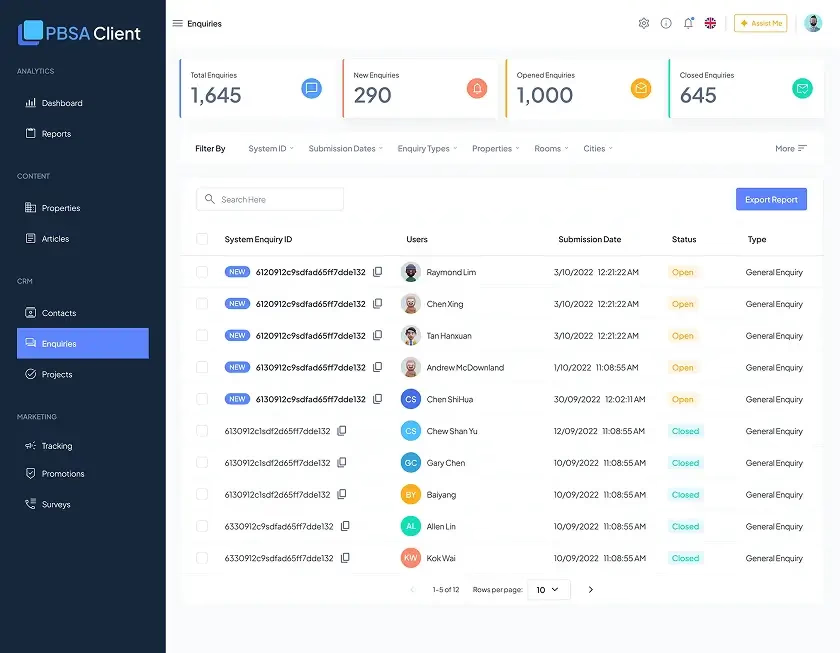
- Central table All enquiries in one place — filterable by status, platform, property, and date.
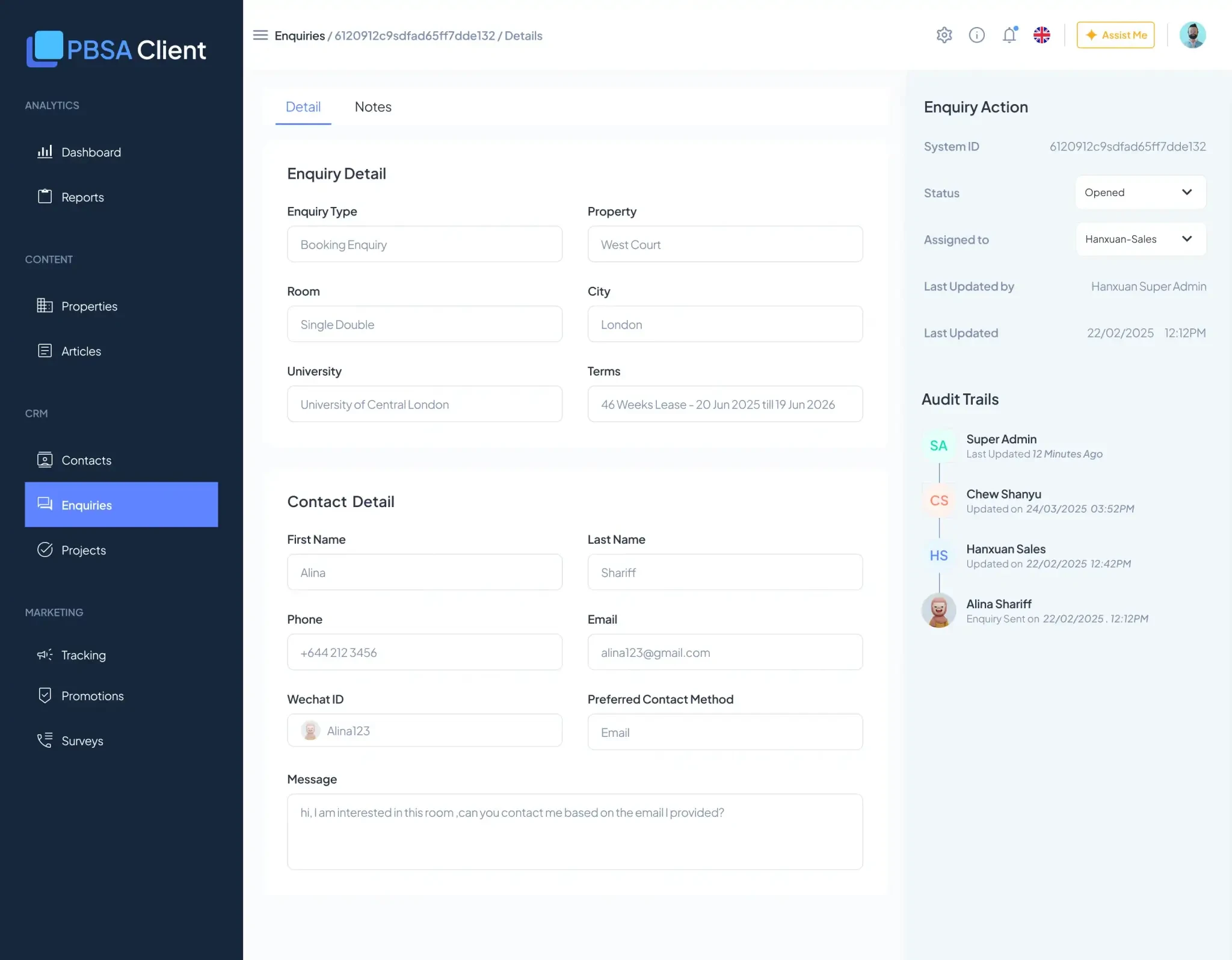
- Detail panel A slide-out with full context: student info, conversation history, submission source.
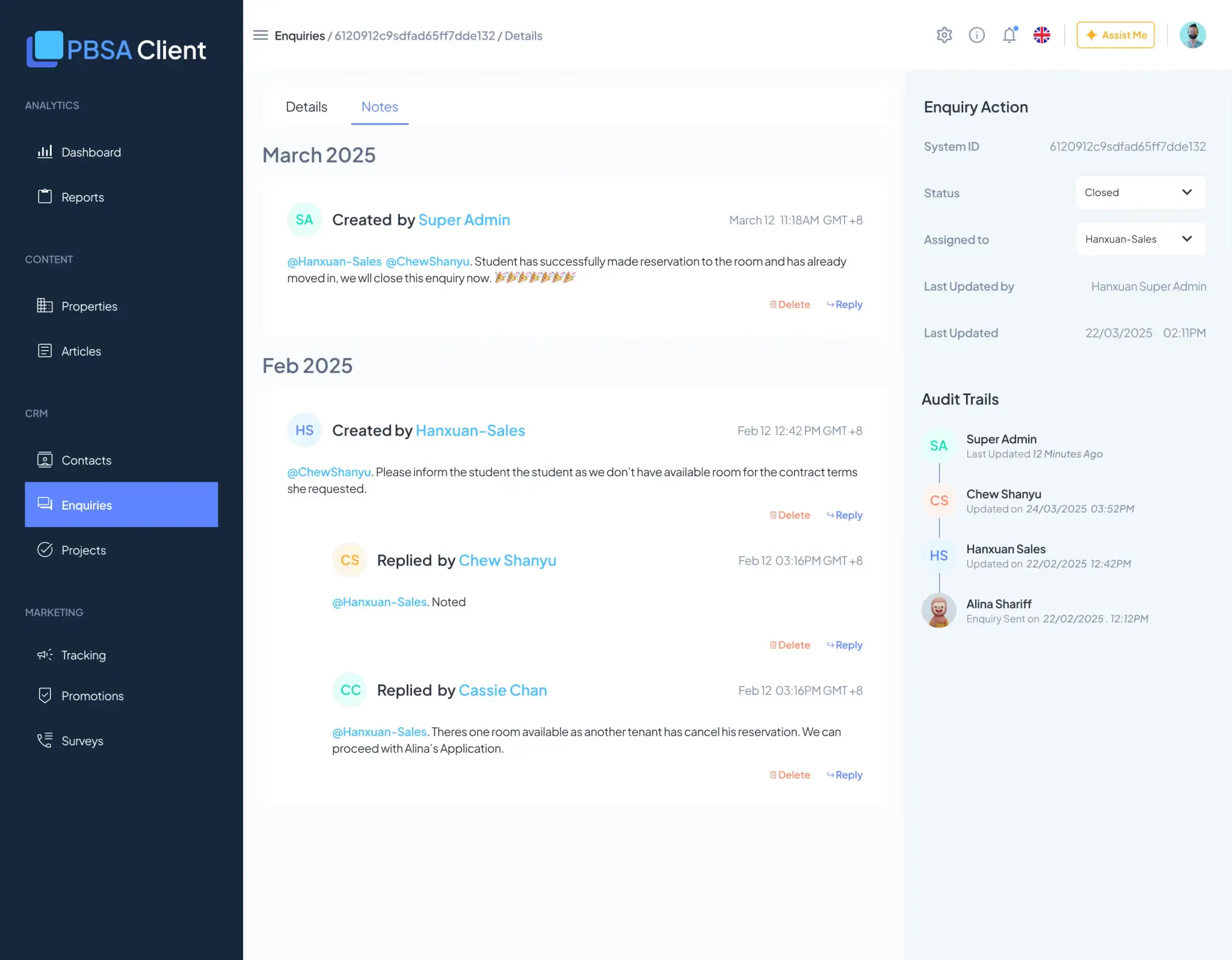
- Internal notes Timestamped, staff-only notes — async collaboration without a separate Slack thread.
- Status workflow New → Pending → Actioned → Closed. A clear handoff mechanism.
- Filter & search Platform, property, status, date range — fast triage.
What actually happened
Internal notes became the default. Within two weeks of launch, the notes section was how the team actually worked. "Who replied to this in WeChat?" became "what did the last person note here?"
Duplicate replies dropped dramatically. When someone opened an enquiry, they could see what had already been done. Not perfect, but massively better than before.
Handoffs worked. When one person passed an enquiry to another, they left a note. The next person had the context.
Staff used it daily. This was the one module where I didn't hear post-launch complaints about missing features or wrong structure. It just worked.
- The problem was obvious
- I didn't need to ask "who uses this, for what?" The pain was visible. Fragmented communication is easy to observe.
- The solution was inevitable
- Once I understood the problem, the answer was clear: unify the sources, show history, enable async notes. No ambiguity.
- I didn't force features
- I included filters, export, and detailed context — but let users choose what they needed. Notes became critical; the rest played secondary roles.
On the Dashboard I assumed. Here I shipped a toolkit and let users decide.
- Slide-out panel
- Users responded without leaving the list view. Fast.
- Notes as permanent context
- Not in Slack (gets lost), not in email (scattered) — attached to the enquiry record. Discoverable and permanent.
- Visible history
- Students' messages and staff replies in one place. Context is complete.
- Fixed status workflow
- New → Pending → Actioned → Closed. Simple and clear — no ambiguity about what "done" means.
- Responsive filtering
- On smaller screens, filters collapse. Usable everywhere, not just at a desk.
What I'd do differently
- Still wouldn't
- Ask "who uses this?" — the problem was too obvious to need it.
- But I would
- Talk to two or three staff before finalizing, just to confirm the assumptions.
The questions I'd ask
- What would break if we removed the internal notes?
- Which filters do you actually use?
- How do you currently track a follow-up?
This would've confirmed the assumptions were right. Instead, I shipped and got lucky.
The honest take
This module succeeded for the right reasons — I understood the actual workflow. But I got lucky. I didn't validate. The problem was obvious enough that I couldn't get it wrong.
If the problem had been less obvious — "make reporting easier," "improve compliance tracking" — I'd probably have made the same mistakes as the Dashboard.
Luck + an obvious problem ≠ good process.
Good process means validating even when the problem seems obvious — especially then, because that's when you're most likely to skip it.
The gap I'm closing
This module taught me the difference between two things:
- Solving real problems
- I did this — enquiries really were fragmented.
- Validating the solution
- I skipped this, and got lucky.
For my next role, I want to do the first and the second — every time, even when the problem seems obvious. That's the discipline I'm trying to build.